Font Settings
Series of font variables for a given style
Details
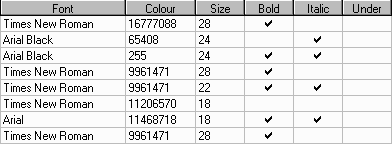
Font - Double-click to select from fonts available on the current system. Be sure to choose fonts that will also be available on any other machines you'll be using.
Colour - Double-click to select colour with which text will be drawn. Any integer value in the range of 0 (Black) to 16777215 (White). See Back - Background Colour for more details on selecting colors.
Size - Size of the font in points. Values may range between 1 (extremely tiny) and 72 (extremely huge). The font with which this paragraph is displayed is 11 points.
Bold - Check to indicate the text should be bold.
Italic - Check to indicate the text should be italicized.
Under - Check to indicate the text should be underlined.
Note you can check any combination of the Bold, Italic, and Under options.