Joystick Continuous
Location:
…\DirectRT\samples\5- other features\04 joystick continuous
Sample Description
DirectRT will allow you to continuously monitor (in 10ms intervals) the motion of a joystick in response to any stimulus. Note that if all you want to do is capture a discrete joystick response (e.g., up, down), then check out the sample titled "joystick and mouse input").
First, you'll have to have a joystick connected to your computer. Second, you'll need to make sure the joystick is setup in Windows. To do this, go to the windows Control Panel and select "Gaming Options". In the "Controllers" tab, click "Add" and select the type of joystick you're using (e.g., 2-axis, 2 button). Then click "Properties, Settings, Calibrate" from the same tab. Calibrate the joystsick according to the instructions and now you're ready to try the sample.
This sample displays images and records negative and positive responses via the joystick using push and pull motions respectively. It will assess joystick action instead of waiting for a key response. Try the "joystick.csv" sample input file and when each picture appears, move the joystick around. After 8 images, the session will end.
So how do you create the experiment? If you open the "joystick.csv" input file you'll see it looks just like any other input file. The difference is that in the Time column, you request "RT:joy2000" for a joystick response of 2000 ms (or RT:joy1500 for 1500ms, etc.). That's the only difference. That tells DirectRT to assess continuous joystick responding instead of waiting for a key or other type of input.
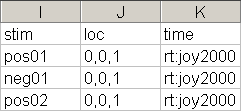
Since monitoring continuous joystick motion creates many data points, a separate data file is dedicated to storing these data. You will find the resulting data in the sample's data folder in a file called "joystick.txt". To open this file in Excel, you will need to select "All Files" in the "Files of Type" box when trying to find it. Then, tell Excel you want to open it as a tab-delimited data file. Note that you can also open tab delimited data files in SPSS in case you have more than 255 variables which is Excel's limit. This will be necessary if you monitor the joystick for much more than two seconds since a data point is written every 10ms (i.e., 2 seconds = 200 data points).
This is an illustration of what the data might look like:
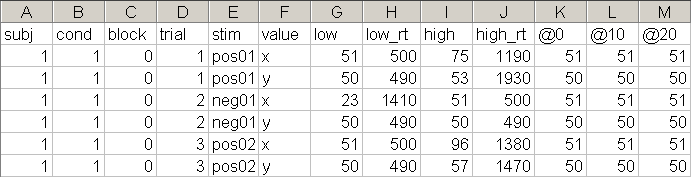
Each trial has two rows--a series of X-values and a series of Y-values. Each row tells you the Subject and Condition IDs from the session. It labels the Block and Trial IDs as well. It then tells you the stimulus (image names in this case) and whether the row contains the X values or Y values. It then tells you the lowest value from 1-100 that occurred on that trial. 1 is far left for X and far down for Y. 100 is far right for X and far up for Y. It then tells you the time at which that lowest value was reached in milliseconds and does then the same data are shown for the high values.
Then, you will see the raw data. These data show you the X (or Y) position of the joystick in 10ms intervals across the stimulus display interval (in this case, 2 seconds)
Discreet and Continuous at Same Time
By simply indicating the number of milliseconds you want to monitor as a negative value such as RT:JOY-2000, DirectRT will take a discrete RT also record any motion activity for up 2000ms.