Require Correct Responses
Location:
…\DirectRT\samples\5- other features\05 require correct response
Sample Description
In some cases you may want to require that the subject respond with the correct key before continuing. To accomplish this you can create a short text file called "incorrect.txt" in your session folder that tells DirectRT to take a special action when valid but incorrect keys are hit. Using this method, if the subject hits a valid but incorrect key then a prompt that you define will appear to tell subjects their response was incorrect and that they need to hit the correct key to continue.
Try running the sample input file "priming.csv." It is the standard priming sample with the exception that the following text file called "incorrect.txt" is located in the session folder:
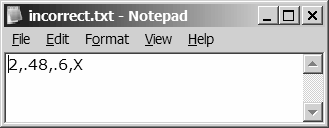
If DirectRT sees the "incorrect.txt" file in your session folder, then it will know to require a correct response on trials. This text file contains 4 values. The first is the style ID that you want to apply to the prompt that occurs when an incorrect response happens. The second value is the x-coordinate for the prompt and the third is the y-coordinate. The fourth value is the prompt itself. So in this case, when an incorrect response occurs, an "X" will appear 48% of the way across the screen and 70% of the way down, and it will appear in Style 3.
Some notes about requiring correct responses:
- The data file will reflect the response time to hit the correct key
- The key code recorded will be that of the correct key
- You can identify that an incorrect key was pressed first by looking in the "Correct" column-those trials on which an incorrect key was pressed first will be labeled as "False.'
- The style you apply to the incorrect response prompt should usually have a MinMax value of 0. This will inhibit DirectRT from prompting subjects to go faster after hitting the correct key. This might be desirable since they probably feel bad enough that they got the answer wrong.
- The incorrect prompt will never be applied to any response that only has one valid response option (including rt:any) . This makes it easy to include instructions screens without the risk of an inappropriate prompt.