Jumping
Jumping is just like skipping except that you come back.
Details
As with skipping, jumping allows you to go off and run one trial of your choosing depending on the response a subject gives. Instead of continuing from the later trial as with skipping, using jumping makes DirectRT return to the fist trial and resume from the trial right after it. This is a convenient way to give feedback and to execute other conditional events that are based on a subject's response.
The command works exactly the same way as the skip command except the arrow goes toward the keycode (i.e., <) instead of away from it (i.e., >). In the example below, each of the allowable responses in trials 1 through 4 is assigned a jump value:
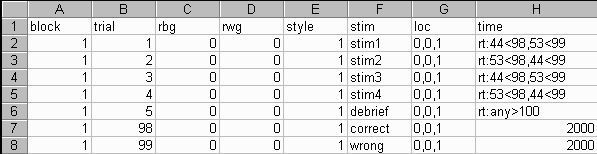
Trials 98 and 99 are images that convey the subject was correct or wrong in their response, respectively. Using a value of 2000 in the time column cell of trials 98 and 99 tells the jump trial to display the image for 2000 ms, after which the trials resume from where the jump initiated.
Note that you will likely want to insert an Unconditional Skip just before these feedback screens so that they are not displayed on their own. In the example above, a debriefing trial occurs on trial 5 in which time any keypress will skip subjects over the feedback trials to trial 100.
Advanced Hint
If you have stimuli following the jump command on the same trial, DirectRT waits until the end of the trial to jump. If you want a jump to be executed mid-trial then assign a negative value to the trial ID. For example, To break out of a trial immediately and jump to trial 100, you could indicate rt:44<-210,53<-210. Subsequent stimuli on the trial will be ignored.